The short answer
You get your brand into Claude by building a design system: one shared reference holding your colours, type, logos, components and the rules around them, made from files you already have. Set it as your organisation's default and every design and deck Claude makes starts from it. Voice goes in a skill. The templates your team already lives in stay in Canva or PowerPoint, where Claude can work on them directly.
Why your brand guidelines on their own don't work
Most teams start the same way. Someone uploads the brand guidelines PDF to a chat, asks for a LinkedIn ad, and gets back something clean, competent and unmistakably generic. Right colours, maybe. Wrong everything else.
The PDF isn't the problem. It was written for designers, who already know what the brand looks like when it's working, so it mostly describes rules. Claude picks up a brand from finished work far better than from rules about it, and Anthropic's own setup guide says the same: a real landing page carries the feel of a brand better than a palette does.
The second mistake is doing it chat by chat. A brand pasted into one conversation is gone in the next, and everyone on the team pastes a slightly different version. Anthropic's admin guide is blunt about where that ends up: "functional but generic" output.
What can Claude design for your brand?
Claude can design most of the visual work a brand puts out, not just ads and decks. If it's words, images, colour and type laid out on a page or a screen, it's in scope, and it exports to PDF, PowerPoint or HTML, or goes straight into Canva for editing (Anthropic).
Advertising
Social ads for every placement size, display banners, retail media creative, a full resize set from one master
Social
Feed posts, carousels, LinkedIn document posts, story templates, quote cards, event announcements
Sales and pitching
Pitch decks, one-pagers, proposals, case study sheets, capability statements
Web and email
Landing pages, microsites, event pages, newsletters, website mockups
Print and in-store
Posters, flyers, brochures, menus, signage, price cards, invitations, business cards
Product
App screens, wireframes, clickable prototypes, onboarding flows, dashboards
Internal
Staff announcements, report covers, infographics, recruitment ads, onboarding packs, certificates
Events
Event branding, name badges, programmes, stage slides, sponsor boards
The same system works for very different businesses.
A restaurant group
Menus, specials boards and the booking page.
A law firm
Seminar invitations and tender documents.
A gym
Class timetables, membership flyers, Instagram stories and the welcome email.
A charity
The fundraising appeal and the annual report.
Once the brand is loaded, ask for a campaign, not an asset. One brief can produce the hero ad, its social cuts, the landing page and the email together, all on brand. Where it stops is production: print files with bleed and the right colour profile, original photography and video still come from your printer, photographer and editor.
How did we use Claude for a campaign targeting the UAE?
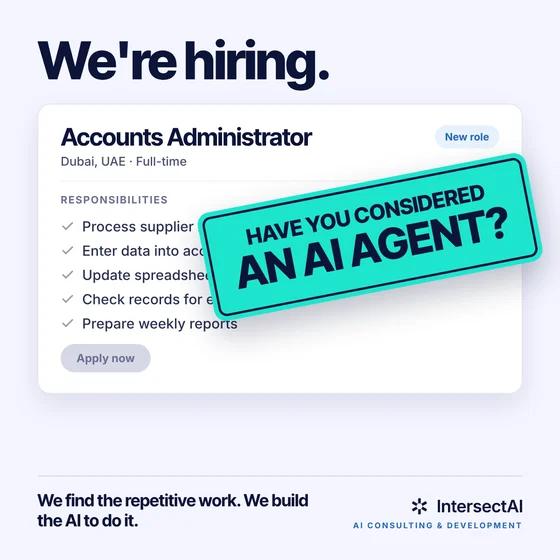
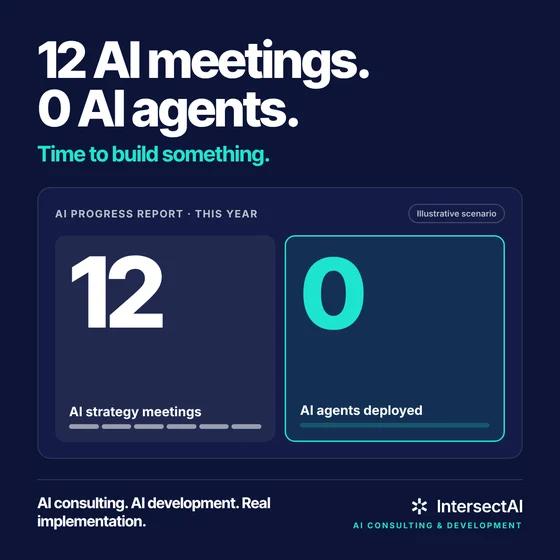
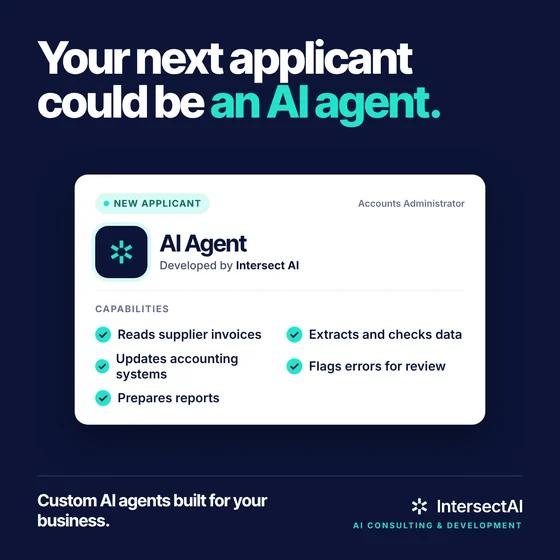
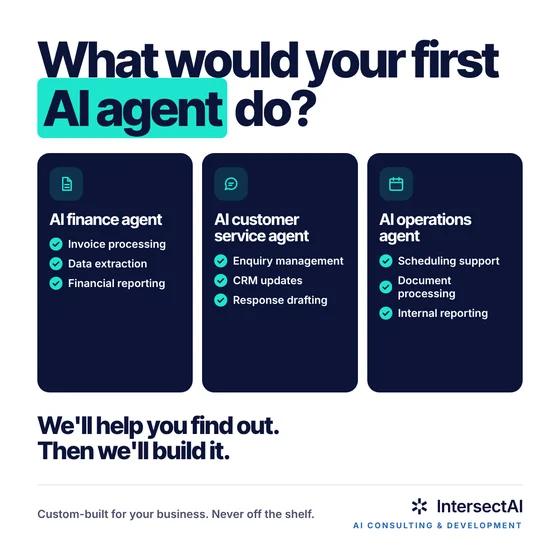
We used Claude to design almost all of an Intersect campaign targeting the UAE in October 2026, over about two weeks. The way we ran it is the part worth copying.
- We started from a written campaign brief for each audience, mid-market and enterprise, covering the buyer, the messages and the offer.
- We asked for several versions of every concept, so the testing plan was built into the creative from day one.
- We built landing pages in pairs for each audience, each pair ending in a different way to convert, so we could test which one works.
- For the blog, Claude read the live site first and matched its fonts, colours and layout, then the finished post went into our CMS as a draft for review.
Here's what it produced.
The writing held up as well as the layouts. Lines like "12 AI meetings. 0 AI agents." and "You've tried AI. Now give it a real job." came out of those sessions and went straight into the ads.
Next, we're working on taking Claude's page designs straight into our CMS, with a person approving each page before it goes live.
What does Claude need to know about your brand?
Claude needs four layers of your brand, and most brand guidelines only hand over two. We call this Intersect's Brand Stack: tokens, assets, examples and rules. Miss a layer and you can see exactly which one in the output.
- What it covers
- Voice, the never list, exceptions, sub-brands, accessibility minimums
- Give Claude
- Your voice doc and the things your designers keep correcting
- What it covers
- Finished work: landing pages, ads that performed, a deck you're proud of, the website
- Give Claude
- PowerPoint and PDF decks, screenshots, the codebase or component library
- What it covers
- Logo lockups (full, mark, mono, reversed), font files, icons, approved photography
- Give Claude
- The actual files, as SVG and font files, not screenshots of them
- What it covers
- Colours with hex values, type scale, spacing, corner radius
- Give Claude
- A tokens file or CSS variables from your codebase. Failing that, the colour and type pages of your guidelines
The layer everyone skips is examples, and it's the one that does the most work. Tokens tell Claude what your blue is. Examples show it how much of that blue you actually use, and where. That's the difference between a design that uses your colours and one that looks like you made it.
Rules are the layer that changes least and gets ignored most. Write down what your designers fix on every junior's work: the logo never sits on a photo, headlines never go above two lines, no stock handshakes. Those corrections are your real brand guidelines.
Where should your brand live in Claude?
Your brand should live in one design system inside Claude, with Canva, PowerPoint and a brand skill added only where your team already works. There are four routes in, and they do different jobs.
Design systemStart here
- Best for
- New designs, decks, landing pages and social assets made in Claude
- What Claude uses
- Codebases, decks, PDFs, logos, fonts, Figma files, connected apps
- Watch out for
- In beta. On Enterprise an owner has to switch it on
Canva connector
- Best for
- Teams whose ads and social already run on Canva templates
- What Claude uses
- Your Canva Brand Kit and brand templates, named in the prompt
- Watch out for
- Canva admins choose which kit and templates Claude can reach. Generation uses Canva AI credits
Claude for PowerPoint
- Best for
- Decks on a corporate or client template
- What Claude uses
- The slide master, layouts, fonts and colours of the open deck, plus a standing Instructions field
- Watch out for
- Only open template files you trust. The instructions apply in PowerPoint only
Brand skill
- Best for
- Voice and rules across everything: copy, docs, emails, UI
- What Claude uses
- A skill written from your guidelines, voice doc and tokens, shared to the workspace
- Watch out for
- The starter version is generic until you add your own corrections
The design system is the one that matters. It's where every design and deck in Claude starts, and as of October 2026 it's a standard part of Claude rather than a separate tool. The standalone Claude Design site Anthropic launched in April 2026 closes on 14 December 2026, and design systems now live as artifacts you can use from any chat. If your team set one up at claude.ai/design, move it before that date.
If your product team already has components in React, there's a shortcut. Running /design-sync in Claude Code reads your existing tokens and components straight from the code, so marketing designs use the same buttons the product does.
How do you build a design system Claude will actually follow?
You build it in an afternoon from files you already have, then spend a week testing it on real briefs. The testing is where it becomes yours.
Tokens
The exact values your brand is made of
Assets
The real files, not screenshots of them
Examples
Finished work. This layer does the most work
Rules
What your designers correct, written down
Tick these off before you open Claude. If the examples card is the hardest to fill, that's the one to fix first.
An afternoon
- Put the whole stack in one folder.Logos as SVG, font files, a tokens file or CSS if you have one, your guidelines, and five to ten pieces of finished work you'd happily show a client. If this takes longer than an afternoon, your brand is less documented than you thought. Worth knowing either way.
- Ask Claude to build the design system from it.Do it from a chat, with the folder attached and any design tools connected. Claude pulls out the colour palette, typography, components and layout patterns (Anthropic).
- Check what it extracted before anyone uses it.Compare the colours against your real hex values and the type against your real fonts. A mistake here shows up in every design afterwards.
The first week
- Test it on three real briefs.A LinkedIn ad, a one-page sales sheet and a ten-slide deck, put next to what your designers would make. Where it misses, add another example rather than another rule.
- Turn the corrections into a brand skill.What you fixed in step 4 becomes the skill's never list, shared to the whole workspace (Claude Academy).
Then roll it out
- Publish it and set it as the default.From then on, new projects pick it up without anyone uploading anything.
- Build the next one.An organisation can run several, one per sub-brand or, for an agency, one per client.
Once it's live, the prompts get shorter. Name the component you want ("use the primary button", "use the two-column case study layout") and Claude reaches for yours instead of inventing one.
How do you share your brand with the rest of the company?
You share it by publishing the design system and pushing the brand skill out centrally, so nobody has to find, download or upload anything. Sharing across an organisation needs a Team or Enterprise plan. On individual plans, nothing is shared.
One trap with PowerPoint: the add-in's Instructions field is personal and only works in PowerPoint. Put brand rules in the template and the brand skill, not in one person's instructions, or the rules leave when they do.
Then tell people it exists, and what to stop doing. A short note from marketing saying "the brand is loaded, stop uploading the PDF to chats" does more than any setting. Anthropic suggests rolling out to two to four designers first, and we'd add sales next: they make the most off-brand decks and have the least time to fix them.
Where does it still fall down?
Claude is now good at layout, type, colour and composition on brand. It is not a replacement for your photography, your illustrator or your senior designer's judgement, and a few things catch teams out.
- It's only as good as what you feed it. Anthropic's own guide warns that a messy codebase or an incomplete design file shows up in the output. Clean the folder before you build.
- Final client work still needs a person. Anthropic's PowerPoint documentation says plainly that it isn't recommended for final client deliverables without human review.
- Templates from outside are a risk. The same documentation warns that downloaded templates and vendor files can carry hidden instructions. Use files you trust.
- Font licences vary. Many desktop font licences don't cover uploading the files to another service, so check yours before step one.
- Unloved systems can disappear. If your organisation's retention period covers artifacts, a design system nobody opens for that period can be permanently deleted, and opening a design that uses it doesn't count.
- It's still in beta. Design systems are a beta feature, so expect behaviour to change.
And it isn't for everyone yet. If your team makes a handful of assets a month, a brand skill and your Canva templates will get you most of the way. The design system pays off when lots of people are making lots of things.
Who should own your brand in Claude?
One designer should own it, the same way someone owns your brand guidelines today. Anthropic recommends an experienced designer, ideally with both brand and product design represented, and a first rollout to two to four trusted designers before everyone else gets access.
Ownership comes down to three habits:
- Lock down publishingOn Enterprise plans, admins can limit who publishes design systems, sets the default and deletes them. Use it, or you'll end up with five slightly different blues.
- Feed corrections backWhen a designer fixes the same thing twice in Claude's output, it goes into the design system or the brand skill. Give people one place to report it.
- Re-run the testEvery quarter, and whenever the brand changes, re-run the three briefs from step 4 and compare. It takes an hour and it's the only way to know the system still works.
If your guidelines change often, schedule it. Anthropic's own example rebuilds the brand skill every Monday from the source folder and writes a changelog of what changed.
What to do this week
Pick an owner, build the folder and run the three test briefs before you show anyone. That's the whole first week, and it tells you whether your brand is ready to hand to Claude or needs tidying first. If your team already built a system at claude.ai/design, add one more job: move it before 14 December.
Load your brand once. Use it everywhere.
If you'd like a hand setting up a design system and brand skill that marketing, sales and product all use, we can help.
Book a call with usFAQ
Which Claude plans include design systems?
Design systems are in beta on Pro, Max, Team and Enterprise plans. They're on by default for Pro, Max and Team. On Enterprise, an owner turns them on in Organisation settings under Artifacts (Anthropic).
Can Claude use our Figma files?
Yes. Figma files are one of the sources you can build a design system from in a chat. With the Figma connector, Claude can also read your published variables, type styles and components (Claude Academy).
What happens to work made at claude.ai/design?
The standalone site goes read-only on 14 December 2026. Projects and design systems can be moved into Claude before then, but chats and comments don't come with them (Anthropic).
Sources
- Anthropic: Introducing Claude Design by Anthropic Labs, 17 April 2026
- Claude Help Center: Set up your design system, checked 28 October 2026
- Claude Help Center: Claude Design admin guide for Team and Enterprise plans, checked 28 October 2026
- Claude Help Center: Move from standalone Claude Design to Claude, checked 28 October 2026
- Claude Help Center: Get started with Claude Design, checked 28 October 2026
- Claude Help Center: Provision and manage skills for your organization, checked 28 October 2026
- Claude Academy: Encode the brand as a skill, 2026
- Claude docs: Use Claude for PowerPoint, checked 28 October 2026
- Canva: Connect Canva to your AI agent, October 2026