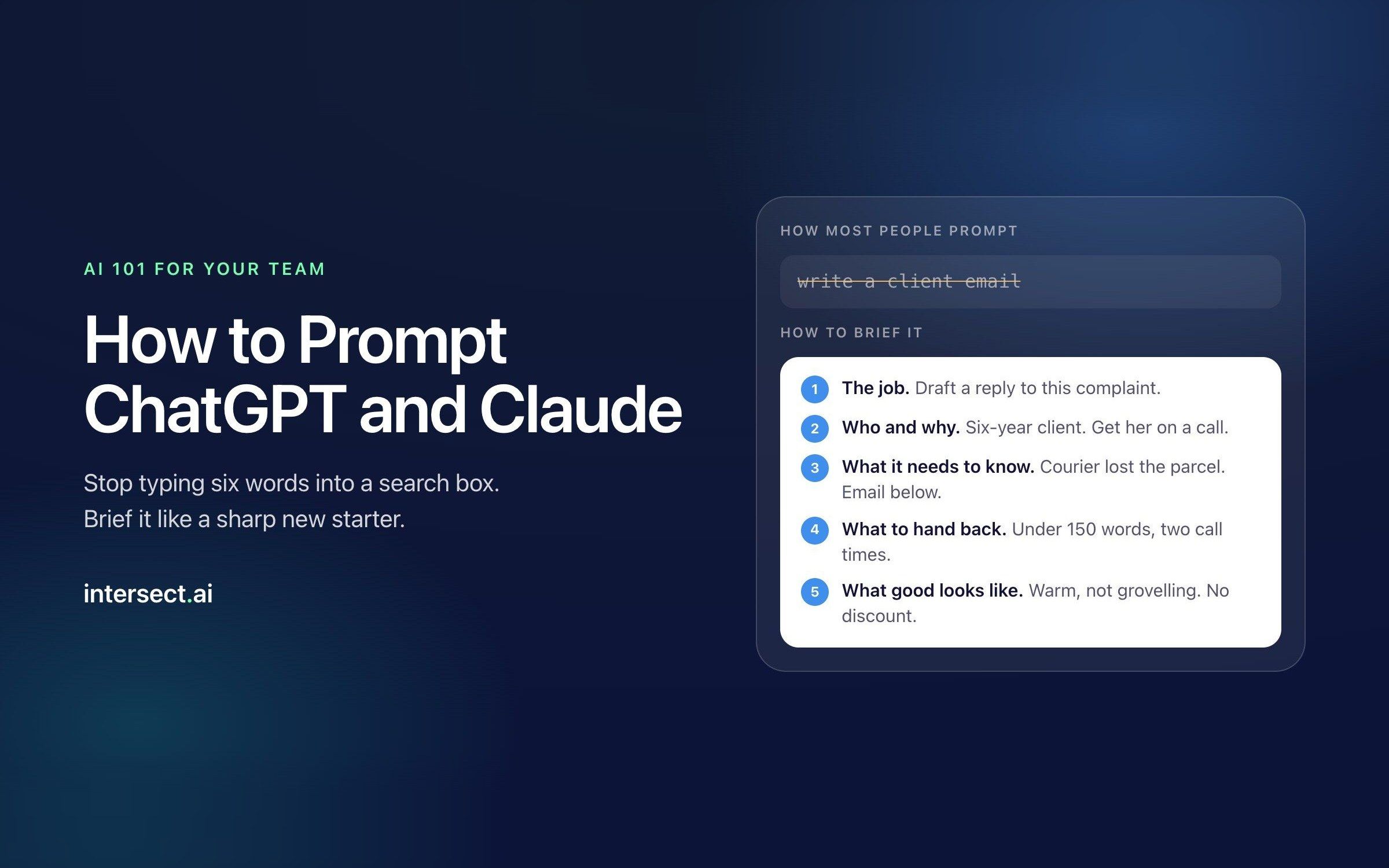

The short answer: brief ChatGPT or Claude the way you'd brief a sharp new starter who knows nothing about your business. Tell it what the job is, who it's for, what it needs to know, what to hand back and what to leave out. Paste in the real material instead of describing it. Treat the first answer as a draft and push back on it. That's most of prompting. The rest is checking the output before it leaves your desk, and that part never gets automated.
Why do most people get average answers from AI?
Because they type into ChatGPT the way they type into Google. Six words, no context, hit enter. The answer comes back generic, slightly too long and written in that cheerful brochure voice everyone now recognises. They conclude AI is overhyped, or they paste it in anyway and someone downstream has to fix it.
The tool isn't the problem. Nobody showed them how to use it.
That's not a guess. PwC's Global Workforce Hopes and Fears Survey 2026 polled 49,364 workers across 48 countries. 64% had used AI at work in the past year, and daily use of generative AI rose from 14% to 22%. Over the same period, the share saying they had adequate access to training fell from 59% to 51%. In the biggest group PwC looked at, the people who do most of the work in most companies, only two in five had the training they needed.
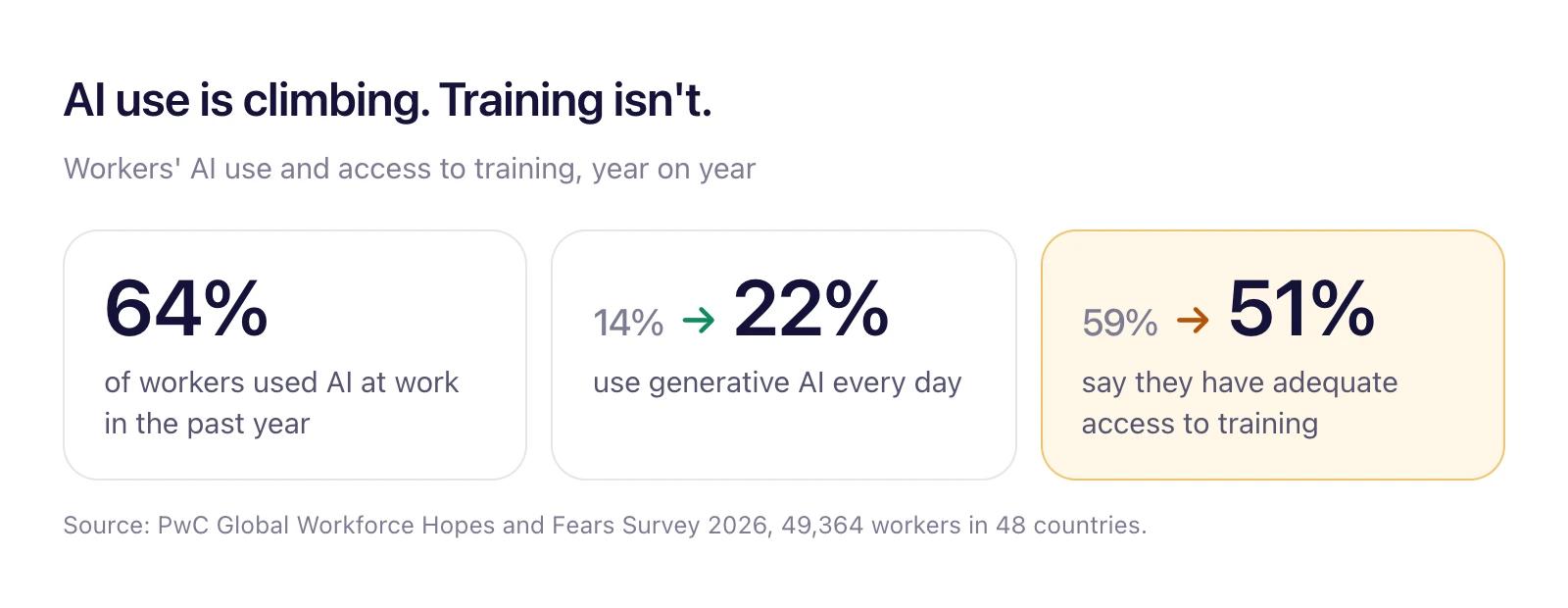
Jobs for the Future found the same thing in the US. In its 2026 survey of more than 3,000 workers, 36% said they had the training and resources to use AI in their jobs, down from 45% in 2024.
So usage is climbing and support is falling. Your team is already using these tools, with or without you. The question is whether they're using them well, and whether anyone has told them what's safe to paste in.
This guide is the session we'd run with a team on day one. No jargon, no "prompt engineering" certificates. Just how to brief the thing so it does useful work.
What is a prompt, really?
A prompt is a brief. That's the whole mental shift.
Anthropic, the company behind Claude, tells people to treat the model like a brilliant new employee who has no context on your norms or how you work (Anthropic's prompting guide). Their test is a good one: show your prompt to a colleague who knows nothing about the task. If they'd be confused, the AI will be too.
OpenAI's own prompt pack for work points the same way. Nearly every template in it has blanks for the audience, the purpose and the tone. The two biggest AI companies agree on this, which tells you it isn't a trick for one product.
Think about the last time you handed work to someone new. You didn't say "write a client email" and walk off. You told them which client, what happened, what you needed the client to do, how formal to be and what not to promise. You might have forwarded an old email and said "like this one."
That's prompting. The AI is fast, well read and keen to please. It also knows nothing about your company, your client or your boss, and it won't ask unless you tell it to. Every gap you leave, it fills with the most average guess available. Average guesses are where the generic answers come from.
The five-line brief
You don't need a framework with a clever acronym. You need five things, and most bad prompts are missing at least three of them. We call it the five-line brief because that's roughly how long a decent one is. Sometimes each line is a paragraph. That's fine too.
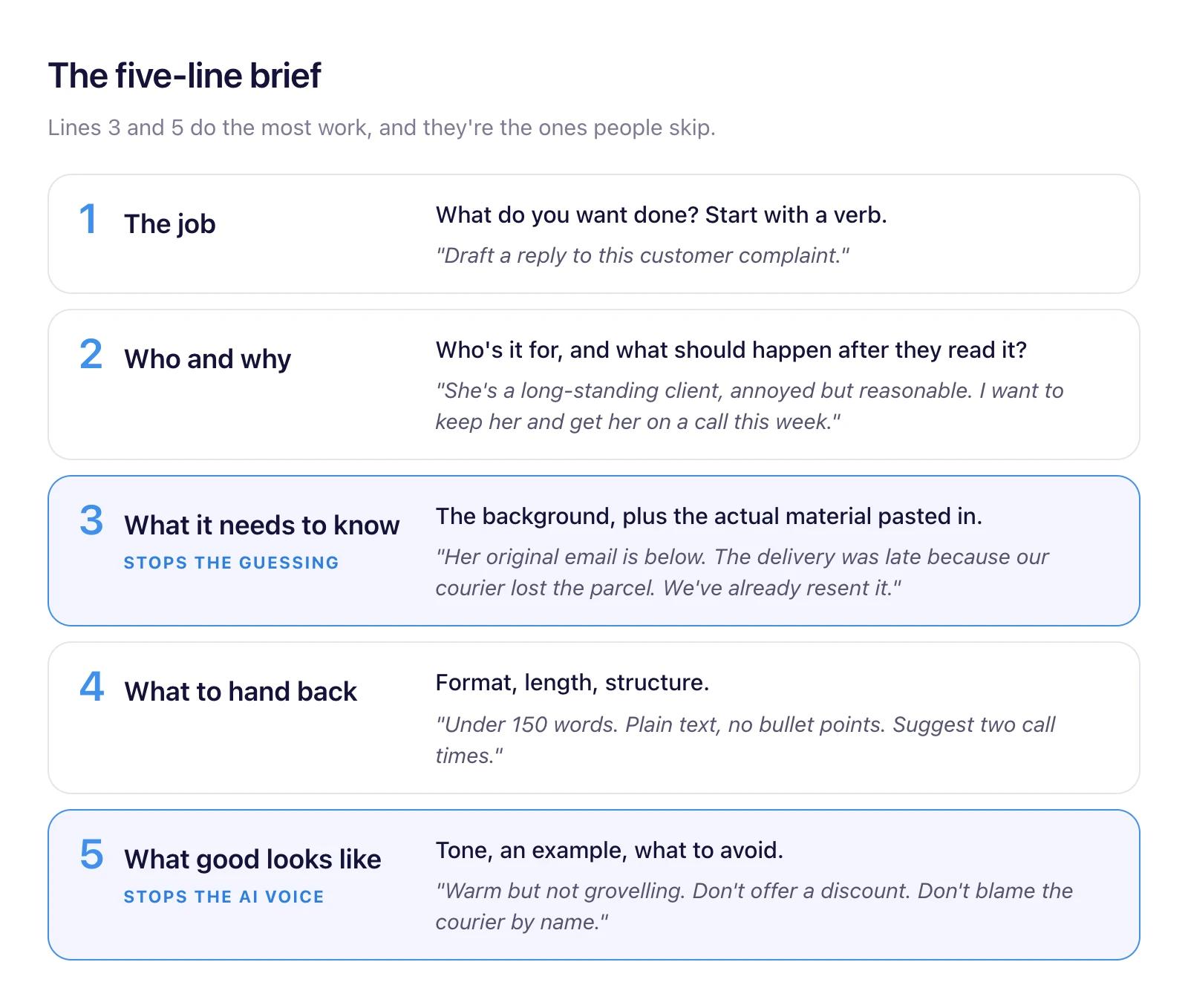
Lines 3 and 5 do the most work, and they're the ones people skip. Line 3 is where the AI stops guessing. Line 5 is where it stops sounding like AI.
Here's the same brief written out the way you'd actually type it:
Draft a reply to the customer complaint below.

She's a client we've had for six years. She's annoyed but reasonable, and I want to keep her. The goal is to get her on a 15-minute call this week so I can sort it out properly.

Background: her order arrived nine days late because the courier lost the first parcel. We resent it at our cost. She found out it was late from her own team, not from us, which is the real problem.

Keep it under 150 words, plain text, no bullet points. Offer two call times: Thursday 10am or Friday 2pm.

Tone: warm and direct, not grovelling. Own the fact that we didn't tell her. Don't offer a discount, and don't name the courier.

Her email:
[paste email]
That took about a minute to write. The reply it produces will need one or two edits instead of a rewrite. That trade, one minute of briefing for ten minutes of fixing, is the whole case for learning this.
Before and after: three everyday jobs
The gap between a weak prompt and a good one is easiest to see side by side. These are three jobs almost every office worker does weekly.
1. Turning meeting notes into something useful
Weak:
Summarise these meeting notes.You'll get a tidy paragraph that repeats the meeting in order, including the ten minutes about the car park.
Better:
Below are my rough notes from a project meeting with our client's finance team. I need to send a follow-up email to the four people who attended.

Pull out:
- decisions we made
- actions, with who owns each one and the date if one was mentioned
- anything still unresolved

Ignore the small talk and anything about the office move. If an action has no owner, flag it rather than guessing one. Keep the whole thing short enough to read on a phone.

Notes:
[paste notes]
Why it works: it says what the summary is for (a follow-up email), who reads it, what to keep, what to drop and what to do when the notes are unclear. The instruction about missing owners matters most. Without it, the AI will happily invent one.
2. Making sense of a spreadsheet
Weak:
Analyse this data.You'll get a list of observations that are technically true and completely useless: "Sales vary by region."
Better:
Attached is our sales export for July to September. Each row is one order. Columns are date, region, product, salesperson and order value in AUD.

I'm presenting to the sales director on Monday. She wants to know why Q3 came in 8% under target.

1. Work out which regions and products account for most of the shortfall against Q2.
2. Check whether it's fewer orders or smaller orders.
3. Give me the three findings that matter most, each with the number behind it.

Show your working so I can check it. If something in the data looks wrong, like duplicate orders or missing values, tell me before you analyse it.
Why it works: it explains what the columns mean, names the real question (why are we under target) and asks for the working. That last line is the one that saves you in front of the sales director.
3. Getting ready for a meeting
Weak:
Tell me about Acme Logistics.Better:
I'm meeting the operations director of Acme Logistics on Thursday. We sell warehouse scheduling software. It's a first meeting and she agreed to it after a cold email.

Search the web and give me:
- what Acme does, roughly how big it is and anything that's changed in the last 12 months
- three problems a business like theirs probably has that we could help with
- five questions I should ask her, ordered from easiest to most pointed

Link every fact to where you found it. If you can't find something, say so instead of filling the gap.
Why it works: it explains who you're meeting and why, asks for live search (both ChatGPT and Claude can do this on most plans), and demands sources. You'll still check them. But you'll have a page of prep in two minutes instead of forty.
Seven habits of people who get good output
The five-line brief gets you most of the way. These habits cover the rest. None of them takes more than a sentence.
1. Paste the material, don't describe it. "Write a reply to a client who's upset about a late delivery" gets a template. Pasting her actual email gets a reply to her. The same goes for policies, old proposals, transcripts and spreadsheets. If the AI can read the real thing, let it.
2. Ask it to interview you first. For anything bigger than an email, add: "Before you start, ask me up to five questions you need answered to do this well." It'll ask the things you forgot to mention. This one habit fixes more bad output than anything else on this list, and almost nobody uses it.
3. Show it what good looks like. Paste a previous email, report or post you liked and say "match the tone and length of this." Anthropic's guide calls examples one of the most reliable ways to steer tone and format. It's much easier than describing a style in words.
4. Say what to leave out. Most of what makes AI writing sound like AI can be switched off by asking. "No bullet points. No headings. Don't open with a compliment. Don't use the words 'leverage', 'seamless' or 'delve'." It'll listen.
5. Give it a role only when the role changes the answer. "You are an expert marketer" adds very little. "Read this as a sceptical CFO who has to approve the spend, and tell me where you'd push back" changes what it looks for. Roles earn their place when you want a specific point of view, usually for critique.
6. Ask for options, not the answer. "Give me three subject lines: one plain, one curious, one urgent." Choosing between three drafts is faster than editing one, and it shows you range you wouldn't have thought to ask for.
7. Break big jobs into steps. Don't ask for a 2,000-word proposal in one go. Ask for an outline, fix the outline, then do it section by section. You stay in control of the structure, and each step is small enough to check properly.
Why the second prompt matters more than the first
The first answer is a draft. People who get great results from AI aren't writing perfect first prompts. They're good at the second, third and fourth.
The mistake is vague feedback. "Make it better" gives the AI nothing to work with, so it makes the text longer and more enthusiastic. Tell it what's wrong, the way you'd mark up a junior's draft:
- "Too long. Cut it by half and keep the second paragraph."
- "This sounds like a press release. Rewrite it the way you'd say it to a colleague."
- "The third point is wrong. We stopped offering that service in March. Take it out."
- "Good. Now give me a version for the board, who care about cost and risk, not features."
- "What's the weakest part of what you just wrote? Fix it."
- "What would a sceptical reader object to here?"
The last two are underrated. Ask the AI to critique its own work and it will usually find the soft spots you'd have found on a second read.
When to start a fresh chat. Long conversations drift. The AI starts mixing in instructions from twenty messages ago, or holding on to a mistake you corrected. If you've changed topic, or the answers are getting worse instead of better, open a new chat. Paste in the best version so far and your brief, and carry on from there. It's not giving up. It's clearing the desk.
Do you prompt ChatGPT and Claude differently?
Hardly at all. Everything in this guide works in both, and in Gemini and Copilot too. A clear brief with real material beats a clever prompt in every one of them.
They do have different defaults. Out of the box, one might write longer, one might reach for bullet points sooner, one might be more cautious on certain topics. Those differences shift with every model update, so we don't build training around them. Your brief overrides the defaults anyway.
The bigger difference for a business is the account, not the model. Use the one your company has paid for and set up, because that's the one with the data protections and admin controls. Which model is "best" matters much less than where your documents already live and what IT has approved.
Set up your standing brief once
Both ChatGPT and Claude let you save instructions that apply to every chat, and both let you group chats and reference files into projects. Most people never touch either. It's ten minutes that improves every answer after it.
In your settings, write a short standing brief about yourself:
I'm a finance manager at a 200-person logistics company in Sydney. I mostly use you for drafting emails to suppliers, summarising reports and checking spreadsheet formulas.

Write in Australian English. Be direct and brief. Skip the preamble and the summary at the end. Use plain text unless I ask for a table. If you're not sure about a fact or a number, say so.
Then use projects for recurring work. A "Board reporting" project might hold last quarter's board pack, the template and a note on what the chair likes to see. Every chat inside it starts with that context, so you stop pasting the same background in every week.
If you manage a team, write the project instructions for your team's most common jobs and share them. That's the cheapest AI training you'll ever run.
What not to paste in
"Paste the real material" comes with one condition: it has to be the company account. Free personal accounts don't carry the same data terms as business plans, and you can't see or manage what's been put into them. If your company hasn't given you an approved tool, ask for one before you start pasting in work.
Even on an approved account, use some judgement. Every company draws the line slightly differently, so check your own AI policy. This is the default we suggest:
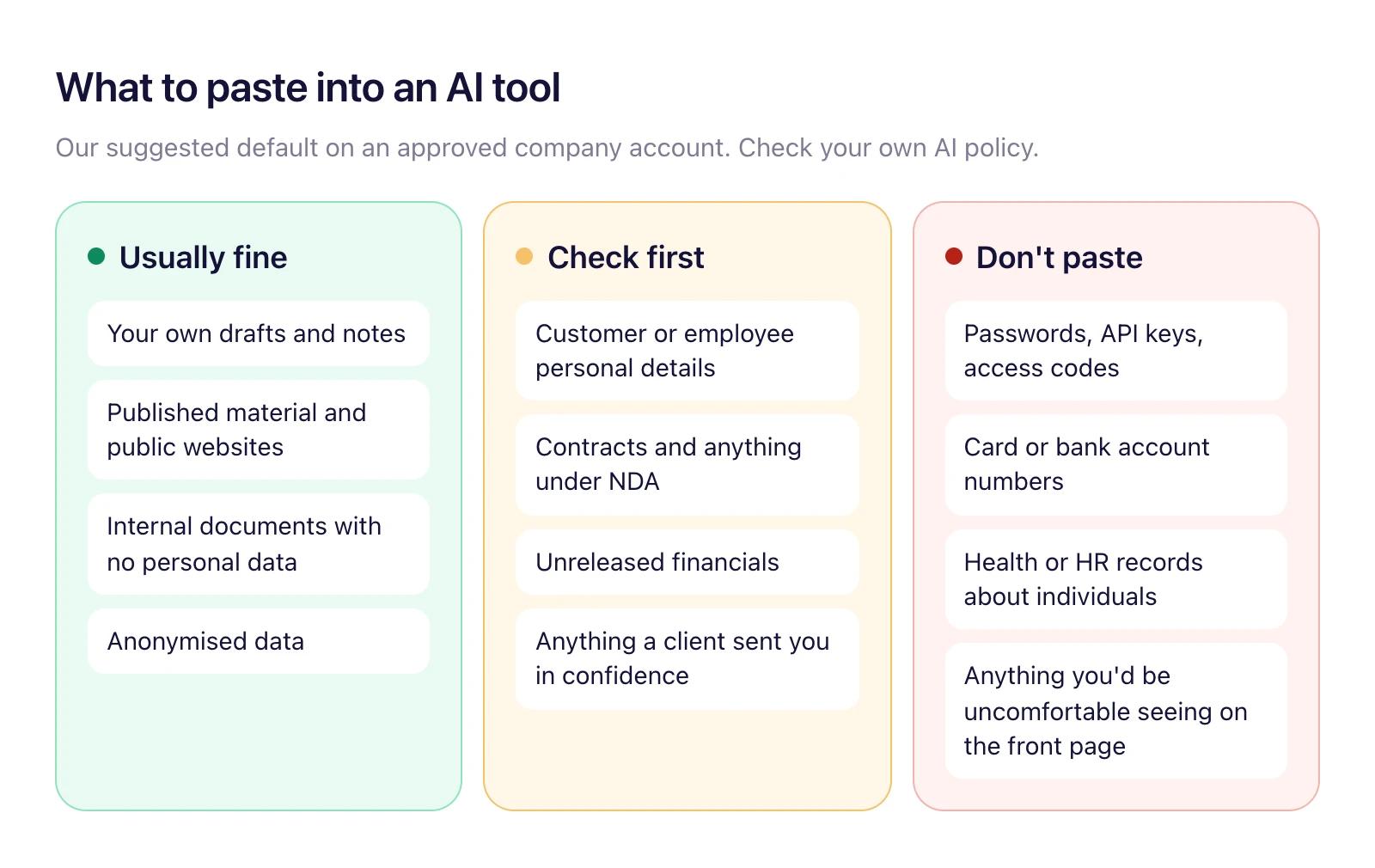
If you're unsure, strip out the names. "Client A was invoiced $40k in March" analyses just as well as the real thing.
Check the output before it leaves your desk
AI makes things up. Not often, and less than it used to, but it does it with total confidence, and the made-up bits look exactly like the true bits. A figure off by a factor of ten, a policy that doesn't exist, a quote nobody said, a link that goes nowhere.
The rule is simple: if your name is on it, you checked it. Before anything goes to a client, a manager or the public, look hard at:
- Numbers. Recalculate anything that matters. Ask the AI to show its working, then check the working.
- Names, dates and titles. These are the easiest things to get subtly wrong.
- Quotes and sources. Click every link. Confirm the source actually says what the AI claims it says.
- Claims about rules. Tax, employment law, compliance. Treat the AI as a starting point, never the final word.
- Anything that sounds too neat. A perfectly round statistic or a tidy story is worth a second look.
You can make this easier from the start. Add "If you're not sure, say so" and "Link every fact to its source" to your prompts, or to your standing brief. The AI will flag its own uncertainty more often when you've told it that's allowed.
Here's the uncomfortable bit. Prompting is the entry-level skill. The skill that actually matters, and the one your team will need more of as AI takes on more work, is knowing when the output is wrong. That comes from knowing your job. No AI course replaces it.
Starter prompts for every team
Copy these, fill in the square brackets and adjust. Each one follows the five-line brief, so they're also worth reading as examples of the pattern.
Sales: follow-up after a first meeting
I had a first meeting today with [name, role] at [company]. We sell [product] to [type of customer].

My notes from the call are below. Draft a follow-up email that thanks her briefly, plays back the two problems she cared about most in her words, and proposes one specific next step. Under 120 words. No attachments mentioned, no "just checking in", no exclamation marks.

Notes:
[paste notes]
Finance: explaining a variance
Below is our monthly P&L against budget for [month]. I need to explain the variances to the leadership team, who aren't accountants.

For each line more than 10% off budget, write one plain-English sentence on what probably caused it, based only on the data and my notes. Mark anything you're inferring rather than reading directly from the numbers. Put it in a table: line item, variance, likely cause, confidence.

[paste P&L and notes]
HR and people: a job ad that doesn't read like every other job ad
Write a job ad for a [role] at [company], a [size and type of business] in [city].

The person will spend most of their time [three real tasks]. They'll report to [role]. Must-haves: [list]. Nice-to-haves: [list]. Salary range: [range].

Write it for someone good who isn't looking. Lead with the work, not the company history. No "rockstar", "fast-paced" or "wear many hats". Under 300 words.
Operations: turning a messy process into a checklist
Here's how our team currently handles [process], written by three different people over two years. It's inconsistent.

Turn it into one numbered checklist a new starter could follow on their first day. Keep the steps in the order they happen. Where the three versions disagree, show me both options and ask which is right instead of picking one.

[paste process notes]
Marketing: getting feedback before your manager does
Below is a draft LinkedIn post for our company page. Our audience is [audience].

Read it as a busy [audience member] scrolling on their phone. Tell me: would you stop on the first line, and if not, why? Which sentence is weakest? What's the one claim a sceptic would challenge? Don't rewrite it. Just give me the critique.

[paste draft]
Customer service: a reply to a difficult email
Draft a reply to the customer email below. Our policy on [issue] is [policy, in a sentence or two].

She's frustrated and partly right. Acknowledge what we got wrong, explain what we can and can't do in plain words, and give her one clear next step. No corporate apology phrases. Under 150 words.

[paste email]
Managers: preparing for a hard conversation
I need to tell a team member that [situation]. He's been with us [time], is generally [description], and I expect him to react with [reaction].

Help me prepare. Give me an opening line that gets to the point in the first 30 seconds, the three things I must say clearly, two questions he's likely to ask with honest answers, and what I should avoid saying. I want to be direct and fair, not soft.
For managers: how to get your team actually using it
Sending everyone a licence and a link to a webinar doesn't work. Usage spikes for a week, then settles back to the three people who were already keen. What works is smaller and more hands-on.
- Pick the tool and write the rules on one page. Which account to use, what not to paste in, and that people are responsible for what they send. If the policy runs to twelve pages, nobody reads it, and people quietly go back to their personal accounts.
- Run one hour with real work. Ask everyone to bring a task they did last week. Brief the AI together, live, using the five-line brief. People learn more from watching their own email get drafted than from any demo.
- Start a shared prompt library. A shared doc or a team project where people drop prompts that worked. Within a month you'll have a better training resource than anything you could buy, written in your company's language.
- Give it five minutes in the weekly meeting. One person shows one prompt that saved them time. It normalises using AI, and it spreads good habits faster than any formal training.
- Name two champions. Not the most technical people. The ones others already go to with questions.
- Measure what stopped being manual. Not logins. Ask people what they no longer do by hand. That's the number that tells you it's working.
If you want the bigger picture on making AI stick beyond the first few weeks, The Three Ps covers how we approach it.
What to do this week
- Log in to the AI tool your company has approved. If there isn't one, ask.
- Write your standing brief: your role, what you use AI for, how you like answers written.
- Take one real task from your to-do list and brief it using the five lines.
- Add "Before you start, ask me questions" to the next big prompt you write.
- Push back on the first answer at least twice before you accept it.
- Save the prompt that worked best and share it with one colleague.
Want your whole team doing this? Intersect runs hands-on AI sessions for teams, built around the work your people actually do rather than generic demos. We start with an approved tool and a one-page policy, then work through real tasks until the habits stick. Book a call and we'll talk through where your team is now.
FAQ
Do I need to learn "prompt engineering"?
No. Prompt engineering is a real discipline for people building AI products. For everyday work, you need to write a clear brief and give useful feedback. If you can brief a colleague, you can do this.
Is ChatGPT or Claude better for work?
For most office tasks the difference is smaller than the difference between a good brief and a bad one. Use the tool your company has approved. If you're choosing for a whole business, look at data handling, admin controls and how well it connects to where your documents already live.
Is it safe to put company information into ChatGPT or Claude?
On a business account set up by your company, generally yes, within your company's policy. On a free personal account, treat anything you paste as having left the building. Never paste passwords, card numbers or personal records about individuals.
How long should a prompt be?
As long as the brief needs to be. A quick rewrite might be one line. A proposal section might be a page, including the material you paste in. Length isn't the goal. Missing context is the problem.
Why does AI make things up?
These models predict likely text. When they don't know something, a plausible-sounding answer is often more likely than "I don't know." Asking for sources, telling it uncertainty is fine, and checking anything that matters all reduce the risk.
Do I need special formatting, like codes or tags?
No. Write in plain language. For long prompts it helps to separate your instructions from the material with a clear label, like "Notes:" or "Here's the email:". That's all the structure most people need.